Subscribe to dotcomUNDERGROUND RSS Feed dotcomUNDERGROUND RSS Feed Add to Google Toolbar Add to Google Reader or Homepage Add to netvibes Add to Pageflakes  Windows Live Alerts
Get updates by email:    

Error 80048820: MSN Error Code 80048820 Fix


Posted on Friday, April 13th, 2007 at 2:29 am
[ Comments RSS Comments RSS ] [ Trackback Link Trackback URL ] [ Share This ] [ PDF Version Download PDF ]

Are you getting the error code 80048820 when trying to sign-in to your msn messenger or windows live messenger?

The error msg goes like:
We were unable to sign you into Windows Live Messenger at this time.
Please try again later.

Error code: 80048820
Extended error code: 80048439
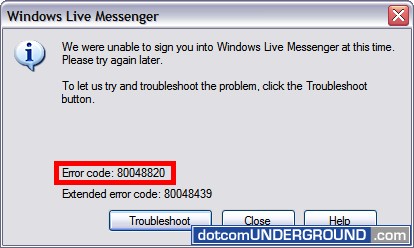
msn error code 80048820

Here is how to solve it.

Step 1:

Go to Start > Run
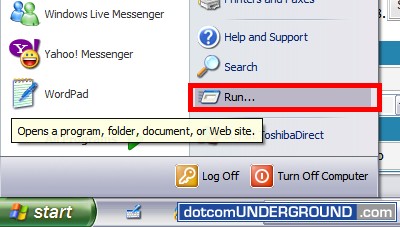
Start - Run

Step 2:

Type the followining in the Run dialogue box:

regsvr32 softpub.dll Wintrust.dll Initpki.dll Rsaenh.dll Mssip32.dll Cryptdlg.dll
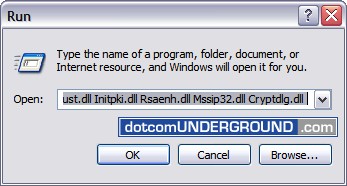
regsvr32 softpub.dll Wintrust.dll Initpki.dll Rsaenh.dll Mssip32.dll Cryptdlg.dll

And click OK.

Step 3:

Again type the followining in the Run dialogue box:

regsvr32 Dssenh.dll Gpkcsp.dll Slbcsp.dll Sccbase.dll
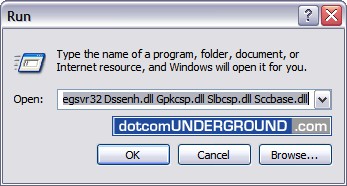
regsvr32 Dssenh.dll Gpkcsp.dll Slbcsp.dll Sccbase.dll

And click OK.

You should now be able to sign-in to your msn messemger or windows live messenger.

Regsrv32 is a command-line tool registers .dll files as command components in the registry. More information on the Regsrv32 command can be found here.


Link to this article:


Tags: , , , , , , , , , ,
Search with Google:
 
Web dotcomUNDERGROUND
This entry was posted on Friday, April 13th, 2007 at 2:29 am and is filed under Tech, Tips and Tricks. You can follow any responses to this entry through the RSS 2.0 feed. You can leave a response, or trackback from your own site.

46 Responses to “Error 80048820: MSN Error Code 80048820 Fix”

Pages: [5] 4 3 2 1 » Show All

  1. 46
    Mr Timothy Morgan Says:

    what is that problem for me cant sign and come up on 80048820!!!

  2. 45
    leigha Says:

    tried puuting in the codes to the run box, all said it completed but still cant sign, same trouble shoot keeps appearing. please help

  3. 44
    okoboko Says:

    It may sound weird but i think it is related to sygate firewall which i installed 10 days ago and the same time got this problem. I did everything including updating dlls, checking system time and date, checking all settings of the explorer also checking my routers MTU settings which is under wan setup but nothing happened at the end. Now, after starting sygate my msn does not work but vice verse when i shut it down. If you are using sygate i reccommend you to start in the first place and then shut and try to log on then.

  4. 43
    JacquiB Says:

    Although this has worked previously, it is not doing it today BUT will keep trying….

  5. 42
    shvan Says:

    shwty

  6. 41
    Mel Says:

    Does anyone know how to get rid of the msn virus, it states that someones sending u a pic but they are not really.. Help!!

  7. 40
    aussie shiela Says:

    I suggest you google the relevent code as what is error code +++++++++ and take it from there I have had 4 different error codes and as it turned out the last code I had was the one that gave me the solution. It may not always be the case with the code you are getting. I had the same code plus the extended code ending in 39 so I googled that and on it went, I have been problem free since replacing my modem as it was the problem.its frustrating but you can fix it

  8. 39
    Liz Says:

    I did everything to fix it but it still doesnt work… what do i do now?!?!

  9. 38
    aussie shiela Says:

    Jackie are you looking in the right area for RUN it should be in your start menu. When you click on start and bring up the menu where you access favorites/programs etc it is the 1st item in the menu above your turn off computer and log off choice. If you are running XP it is there. You should have that on yr puter.

  10. 37
    Jackie Says:

    i dont have a run box so what do i do from there

Pages: [5] 4 3 2 1 » Show All

Leave a Reply

People come here looking for: 80048820 (2192), error code 80048820 (680), 80048439 (404), error 80048820 (335), msn error 80048820 (245), error code 80048820 Extended Error code 80048439 (232), extended error code 80048439 (208), error code 80048439 (195), 80048820 vista (166), msn error code 80048820 (163), Error 80048439 (141), 80048820 80048439 (123), msn messenger error code 80048820 (111), msn error 80048439 (104), msn messenger error 80048820 (94), 80048416 (94), erro 80048820 (93), Fix Error Code 80048820 (93), error code: 80048820 (84), msn 80048820 (84), msn error code 80048439 (78), 80048820 80048416 (68), 80048820 error (60), Error Code: 80048820 extended error code: 80048439 (58), msn error (56), extended Error code: 80048439 (51), error 80048416 (50), msn error 80048416 (48), 80048820 msn (47), 80048820 msn error (47), error code 80072ee7 (46), 81000378 (40), Do Fix Error 80048820 (40), msn error codes (39), extended error code 80048416 (38), MSN error code (33), Error code 81000378 (33), msn error 80072ee7 (32), error code 80048416 (32), error (32), 80048820 error code (31), msn error code 80048820 extended error code 80048439 (30), windows live messenger error code 80048820 (29), vista 80048820 (29), messenger error code 80048820 (28), error code 80048820 vista (27), erro code 80048820 (27), error 80072ee7 (26), msn 80048416 (24), error code:80048820 (23),


