With the new Windows Live Messenger IM Control now you can allow your site, blog or social netwok profile visitors to send messege to your MSN Messenger or Windows Live Messenger directly from your site without the requirement to install or add you to his msn messenger contact list.
To get the HTML code which you can use on your site first go to the following url:
http://settings.messenger.live.com/applications/websettings.aspx
Sign in with your Windows Live ID if needed.
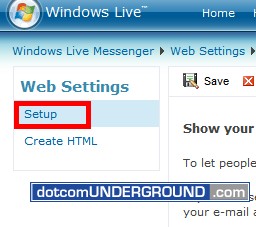
You should be on the “Setup” page. If not, click on the “Setup” link.
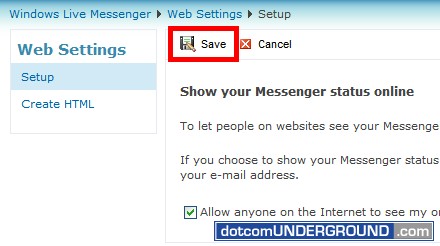
Click on the “Allow anyone on the Internet to see my online status and send me messages” check box to enable it.
Now click on “Save“.
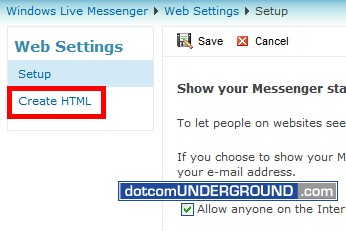
Then click on the “Create HTML” link in the left side menu bar.
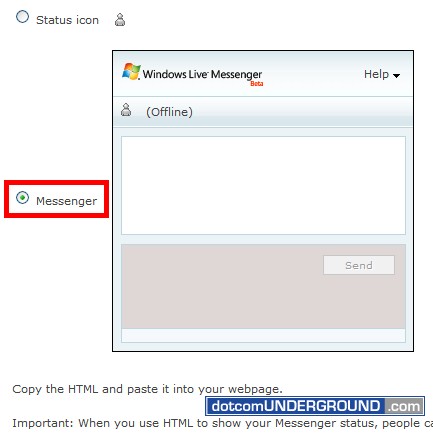
As we are going to allow our site visitors to send us messege, we are going to select the “Messenger” link.
At the bottom bottom of the page you will find the required HTML codes.
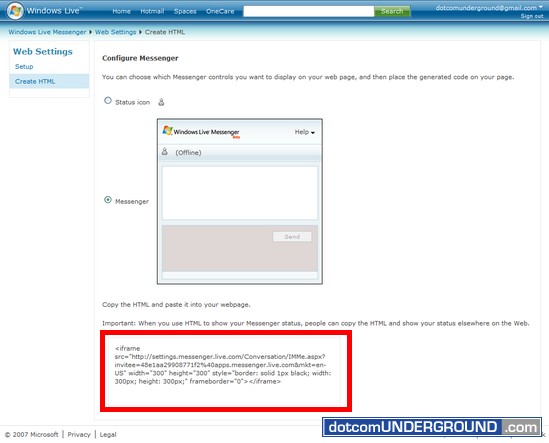
Now paste the HTML code on your site, blog or profile and you are done!




Tags: MSN Messanger, MSN Messenger, MSN Messenger 2008, Tech, Technology, Tips and Tricks, Windows Live Messenger, Windows Live Messenger 2008, WLM
Categories: Tech, Tips and Tricks, Tutorials


