Sunday, October 12th, 2008




Tags: MSN Messenger, MSN Messenger 2009, MSN Messenger 9, Tech, Technology, Tutorials, Windows Live Messenger, Windows Live Messenger 2009, Windows Live Messenger 9, WLM, WLM 9
Categories: Tech, Tips and Tricks, Tutorials
The latest build of Windows Live Messenger 9 (also known as MSN Messenger 9, WLM 9, Windows Live Messenger 2009, MSN Messenger 2009, WLM 2009) provides a new feature calles “Favorites”.
Basically its a special contact group which makes it easy to communicate with your frequently used (or most important) contacts by sticking them on top of everything. Very similar to “sticky threads” on forums.
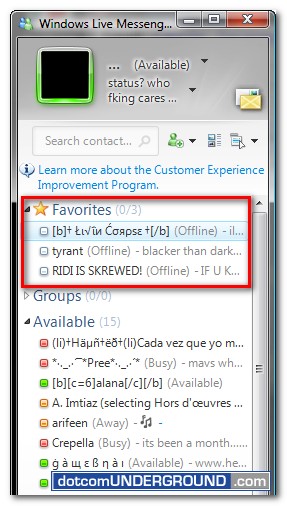
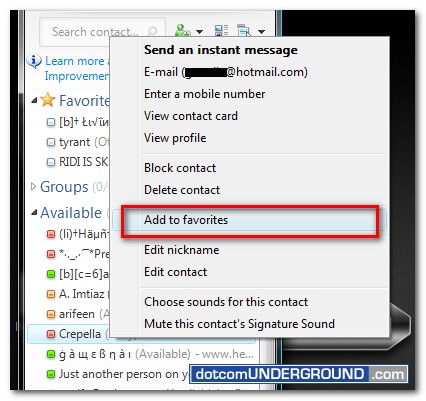
How you add a friend to this “Favorites” group?
Right click on the contact you wish to add to favorites and click on “Add to favorites”
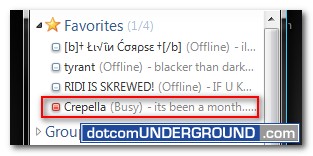
You will find the contact added to the “Favorites Group”
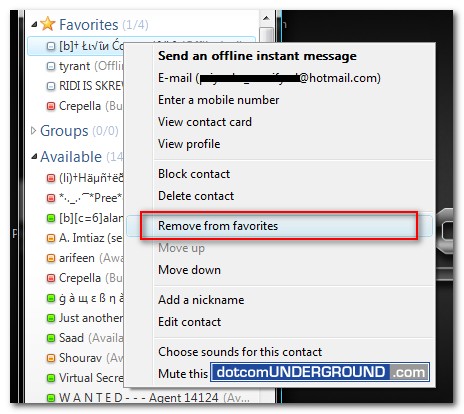
A contact can be removed by right clicking on the contact and then clicking on “Remove from favorites”
Tags: MSN Messenger, MSN Messenger 2009, MSN Messenger 9, Tech, Technology, Tutorials, Windows Live Messenger, Windows Live Messenger 2009, Windows Live Messenger 9, WLM, WLM 9
Categories: Tech, Tips and Tricks, Tutorials


