ipconfig is a Windows XP / 2000 / 2003 / Vista command utility that displays all current TCP/IP network configuration values and refreshes Dynamic Host Configuration Protocol DHCP and Domain Name System DNS settings. You can use the same tool to clear out Windows DNS cache. This command has /flushdns switch to flush and reset the contents of the DNS client resolver cache. During DNS troubleshooting, you can use this procedure to discard negative cache entries from the cache, as well as any other entries that have been added dynamically.
To clear DNS resolver cache login as administrator and open command prompt.
To open command prompt first click on the Start button.

Then click on Run…

Now type “cmd” and click on the “OK” button.
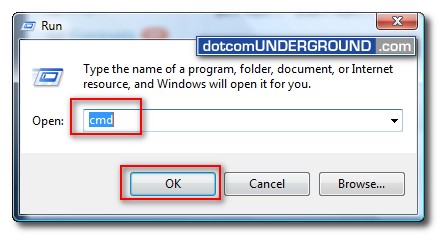
This will bring up the command prompt.
Now type:
ipconfig /flushdns
and hit enter.
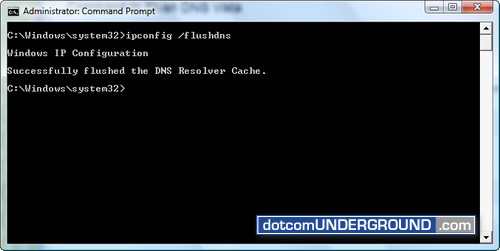
You should get the confirmation message of the dns resolver cache getting cleared as “Successfully flushed the DNS Resolver Cache.”
If you get the error “The requested operation requires elevation.â€, learn How to solve “The requested operation requires elevation†error in Windows Vista.




Tags: DNS, Windows-Vista, Windows-XP
Categories: Tech, Tips and Tricks, Tutorials


