Join dotcomUNDERGROUND on Facebook Follow dotcomUNDERGROUND on Twitter Get updates by email dotcomUNDERGROUND RSS Feed
Sunday, October 18th, 2009
Share on Facebook

Is your firefox not storing cookies for longer than a session? Do you need to login to the sites every time you exit firefox even when you have “remember me” checked for the sites?

Most likely its happening as the file that stores cookies got corrupt.

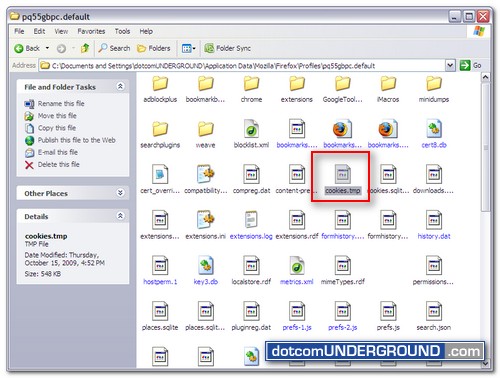
To fix it you need to go to your profile folder and rename cookies.sqlite to cookies.tmp

For Windows Vista/XP/2000 your default profile folder is:
%APPDATA%\Mozilla\Firefox\Profiles\xxxxxxxx.default\

And for Windows 98/Me the profile folder is:
C:\WINDOWS\Application Data\Mozilla\Firefox\Profiles\xxxxxxxx.default\

Here xxxxxxxx represents a random string of 8 characters.

Here is how you can go to your profile folder:

On Windows Vista:
1. Click the Windows Start button, and type %APPDATA%\Mozilla\Firefox\Profiles\ in the Start Search box near the bottom of the Start menu, without pressing Enter. A list of profiles will appear in the top left of the Start menu.

2. Click on any of the profiles (e.g. xxxxxxxx.default) to open it with Windows Explorer.
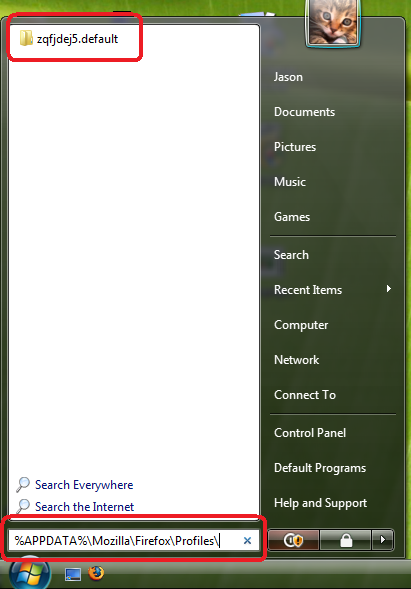
Firefox Profile Folder - Vista

On Windows 2000 and XP:
1. Click the Windows Start button, and select Run….
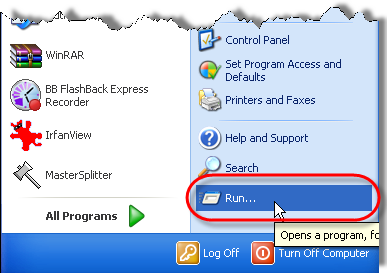
Firefox Profile Folder - Windows XP - 1

2. Type in %APPDATA%\Mozilla\Firefox\Profiles\ then click OK.
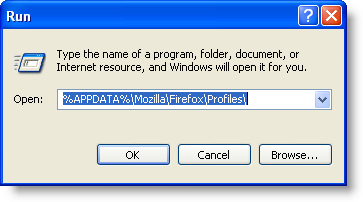
Firefox Profile Folder - Windows XP

3. Windows Explorer opens a folder containing your profiles.

4. Double-click the profile folder you wish to open (e.g. the xxxxxxxx.default folder).

Now look for the file cookies.sqlite.
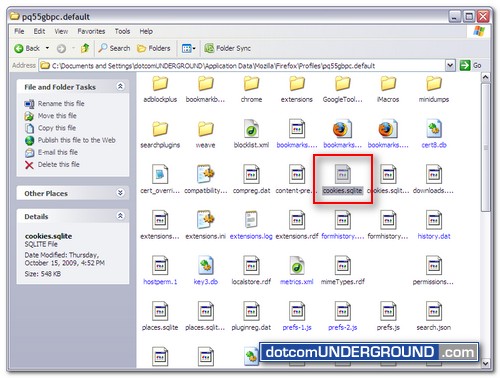
firefox - cookies.sqlite

And rename the file to cookies.tmp.
firefox - cookies.tmp

Now restart Firefox and log into the sites again. From now on it should be able to remember your login (cookies).



Join dotcomUNDERGROUND on Facebook Follow dotcomUNDERGROUND on Twitter Get updates by email dotcomUNDERGROUND RSS Feed
Get updates delivered to your email:  Enter email address:  

Tags: ,
Categories: Tech, Tips and Tricks, Tutorials
Visitors come here looking for: firefox not saving cookies (126), firefox not storing cookies (57), firefox 4 not saving cookies (39), firefox not remembering cookies (32), firefox not saving cookies windows 7 (26), Firefox cookies not saving (23), Windows 7 Firefox cookies (22), firefox windows 7 cookies (18), firefox not cookies (13), firefox not remembering facebook login (12), firefox cookies windows 7 (11), mozilla not saving cookies (10), firefox not keeping cookies (10), cookies.sqlite windows 7 (9), cookies.sqlite (9), firefox not remembering data that i type (9), firefox not saving logins (8), firefox cookies location windows 7 (8), cookies not saving firefox (7), windows 7 firefox not saving cookies (7), firefox login cookies (6), firefox cookies (6), firefox not saving facebook cookies (6), firefox 4 not storing cookies (6), Firefox 4 not keeping cookies (6), profile folder in windows vista (6), 5appdata5 (6), firefox no longer storing cookies (5), firefox remember cookies (5), firefox not storing login (5), rename cookies.sqlite (5), facebook firefox cookies (5), facebook not saving cookies (5), Appdata (5), firefox not remember facebook login (4), not storing cookies (4), firefox not storing cookies correctly (4), windows 7 not saving cookies (4), firefox not remembering facebook (4), cookies FIREFOX WINDOWS 7 (4), firefox not remembering login (4), firefox cookies not saved (4), firefox 4 cookies (4), firefox 4 cookies not saving (4), firefox 4 not remembering cookies (4), firefox 5 cookies (4), firefox 5 not saving cookies (4), firefox windows 7 cookies not storing (3), storing cookies (3), cookies.sqlite firefox (3),

Get Update Notifications

 Subscribe in a reader Or, subscribe via email:
Enter your email address:  
Subscribe to dotcomUNDERGROUND RSS Feed Add to Google Reader or Homepage Add to Netvibes Add to Pageflakes Add to Yahoo! Add to Windows Live Alerts

dotcomUNDERGROUND RSS Feed
Find entries :

Browse by Tags »