Sunday, June 24th, 2007




Tags: MSN Messanger, MSN Messenger, Tech, Technology, Tips and Tricks, Windows Live, Windows Live Messenger, Windows-Vista, Windows-XP, WLM
Categories: Tech, Tips and Tricks
Are you unable to install Windows Live Messenger 8.5 Beta (MSN Messenger 8.5)?
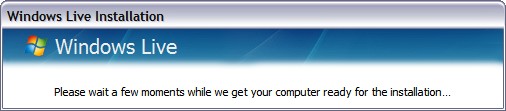
Do your installation gets stuck at “Please wait a few moments while we get your computer ready for the installation…” ? The installer disappears and does not continue after this screen?
You can proceed with the following:
Make sure you have “show hidden files” set on your system.
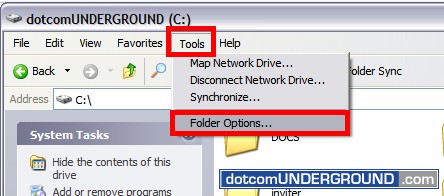
You can set it by going to “View > Folder Options”
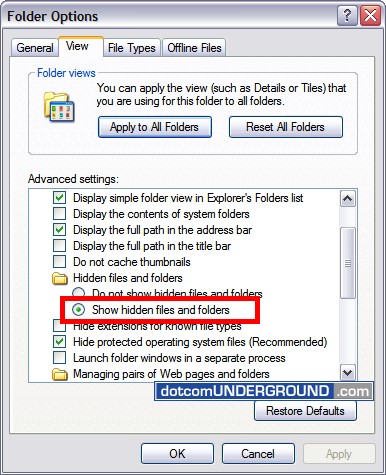
And select “Show hidden files and folders”
If you are on Windows Vista, browse to:
C:/ProgramData
And if you are on Windows XP, browse to:
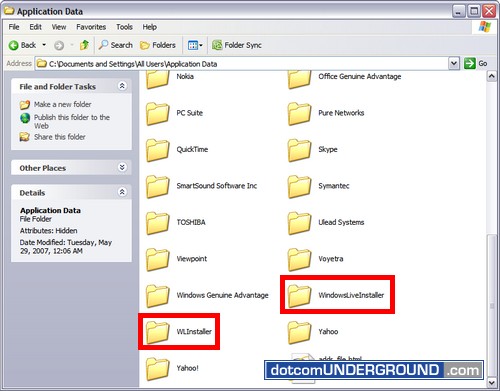
C:/Documents and Settings/All Users/Application Data
Now delete the folders WindowsLiveInstaller and WLInstaller.
Run the installer again and everything should work fine.
Tags: MSN Messanger, MSN Messenger, Tech, Technology, Tips and Tricks, Windows Live, Windows Live Messenger, Windows-Vista, Windows-XP, WLM
Categories: Tech, Tips and Tricks


