Are you having problem loading Gmail on Internet Explorer 7? After showing the “Loading…” screen for a while IE7 throwing you the error:
Internet Explorer cannot open the Internet site http://mail.google.com/mail/.
Operation aborted
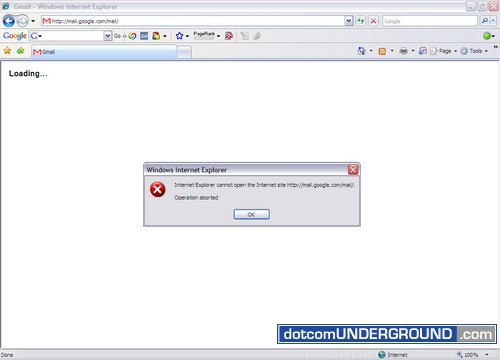
I have been experiencing the issue since yesterday. Here is how i solved it:
1. Click on “Tools > Delete Browsing History…”
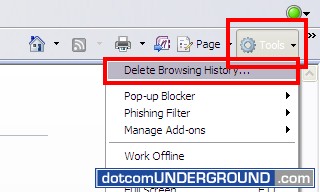
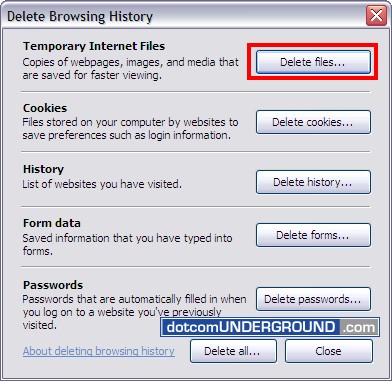
2. “Delete Internet History” dialogue box will come up.
Click on the “Delete Files…” button next to “Temporary Internet Files”
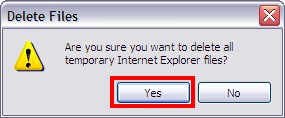
3. Click “Yes” to confirm the operation.
Internet Explorer 7 will take some time to delete the files.
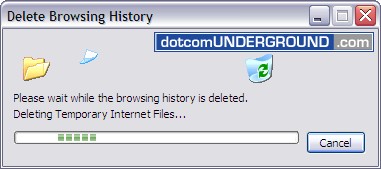
Once done, refresh the page (or better close and reopen the browser) and Gmail should load perfectly on IE7.


Download PDF
June 22nd, 2008 at 7:01 am
You can do what you want just seize the day
What you’re doing tomarrow’s
gonna come your way
Don’t you ever consider giving up
You will find, oooh
It’s a beautiful Life, oooh
I just wanna be here beside you
And stay until the break of dawn
Take a walk in the park when you feel down
There’re so many things there
that’s gonna lift you up
See the nature in bloom, a laughing child
Such a dream, oooh
It’s a beautiful Life, oooh
I just wanna be here beside you
And stay until the break of dawn
You’re looking for somewhere to belong
You’re standing all alone
For someome to guide you on your way
Now and forever
It’s a beautiful Life, oooh
I just wanna be anybody
We’re living in different ways
It’s a beautiful life, oooh…
******************************************************************************
************************** Akash = +33 0626417350. *********************
June 12th, 2008 at 10:52 am
Thanks for your suggestion. It worked !!
Cheers,
Ronnie a.k.a Ronald Vijay or Vijay
June 7th, 2008 at 4:25 pm
sexy ggirls contact me +8801724775279( mid night0
May 31st, 2008 at 11:26 pm
A better and permanent solution, and an easy one: switch off IE7 pop-up blocker. Works a treat, though not better than switching to Firefox.
May 29th, 2008 at 11:25 am
Hi, this is not the perement solution we want perment solution
May 10th, 2008 at 8:41 pm
@eatmeimadonut and porcine fornicator:
and you guys got a better solution?
May 2nd, 2008 at 2:43 am
Hey all,
Internet Police, this sounds a bit like conspiracy theory, but i would not be surprised if it was true. MSFT has troubles to persuade YHOO to get onboard against GOOG dominance, and of course, whole deal is to counter GOOG. As such, MSFT would not care (and may even encourage) a bit of troubles with google based systems. War has already begun and we may see some new weapons along the way…
April 29th, 2008 at 12:35 pm
Hi All!
The problem lies somewhere else! Microsoft has recently offered to buy Yahoo! in a way to counter the growing popularity of Google. While the deal is yet to close, Microsoft has also started a dirty game of making Google unpopular among its users. Since many users have IE browsers, it will be easier for Microsoft to create such a mess. I just have one thing to say…do Gates’ employees know that there are other browsers as well? I suffered the same problem for over a week. I have downloaded Moxilla and GMail is running absolutely fine! hats off to Mozilla and to hell with IE…
April 27th, 2008 at 6:21 pm
Here’s the official solution from Google:
http://mail.google.com/support/bin/static.py?page=known_issues.cs&knownissue=gmail_issue_ie7operationaborted&topic=12778
However, I do not respect them because Google asks us to use their older version of GMail, instead of fixing the bug accordingly - while lots of people use Internet Explorer 7.0!
April 27th, 2008 at 5:07 pm
Don’t waste our time with absurd inane and alleged solutions, asshole.




