Join dotcomUNDERGROUND on Facebook Follow dotcomUNDERGROUND on Twitter Get updates by email dotcomUNDERGROUND RSS Feed
Tuesday, February 22nd, 2011
Share on Facebook

Facebook has introduced a new photo viewer which uses a light box to display the photos. However, if you don’t like using the new viewer, you can go back to old way with a simple adjustment to the browser address bar.

Once you have triggered the Lightbox Photo Viewer (the one with black background), look at the browser address bar. You will notice &theater at the end of it.
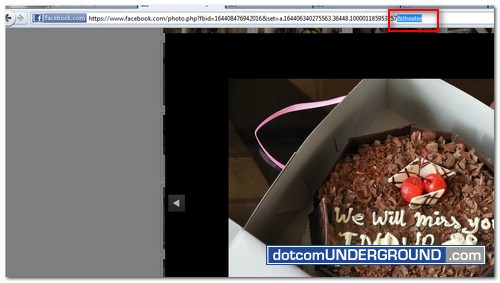
Just for a closer look:

Now simply remove the &theater part and hit Enter on your keyboard. You will be back to the Old Photo Viewer.

Once applied, it will stay with the Old Viewer for viewing rest of the album. But when viewing another album, you might need to apply the tweak again.

If the issue of not being able to save photos on the Lightbox is just why you don’t want to use it, check my other post on How to save photos from new Facebook Lightbox.



Join dotcomUNDERGROUND on Facebook Follow dotcomUNDERGROUND on Twitter Get updates by email dotcomUNDERGROUND RSS Feed
Get updates delivered to your email:  Enter email address:  

Tags: , ,
Categories: Tech, Tips and Tricks, Tutorials
Visitors come here looking for: facebook old photo viewer (37), facebook old photo (5), how to view facebook pictures the old way mac (4), old photo view facebook (2), facebook old photo view (2), facebook old foto (1), facebook old viewer (1), facebook old photoviewer (1), facebook old photo preview (1), facebook old photoview (1), facebook old photo viewer (1), facebook old picture (1), how to go back to old view for albums on facebook on mac (1), facebook old picture view (1), facebook old photos (1), facebook how to get pictures displayed the old way (1), how do you get facebook to the old photo viewer (1), view facebook photos old way on mac (1), get the old look for photos on facebook (1), how to view facebook pictures the old way (1), how to view facebook photos the old way mac (1), how do you look at facebook pictures the old way (1), facebook "old photo viewer" (1), lightbox in facebook app (1), how to download old photos (1), why old albums showing in picture feed (1), how to view pictures in facebook the old way (1), view photos old way facebook (1), how do you look at facebook photos in old viewer (1), why when i view facebook photo it has a black background (1), old way to view Facebook photos (1), how to facebook old photo viewer (1), facebook new lightbox download (1), how to go back to the old photo viewer on mac (1), viewing facebook pictures old way (1), how to view facebook pictures the old way on mac (1), how to view photos on facebook the old way on a mac (1), facebook view photos old way mac (1), tutorial on how to view the old photo viewer on facebook (1), how do you view facebook photos the old way on a mac (1), facebook old preview (1), how do you view pictures on facebook the old way on a mac (1), saving facebook pictures from lightbox (1), mac view facebook photos the old way (1), how do you look at facebook photos the old way on a mac (1), facebook photo old view android (1), how to view pictures on facebook the old way on a mac (1), how do you get to the old pictures on facebook with a mac (1), how to view facebook photos the old way on mac (1), can i force the old photo viewer in facebook (1),

Get Update Notifications

 Subscribe in a reader Or, subscribe via email:
Enter your email address:  
Subscribe to dotcomUNDERGROUND RSS Feed Add to Google Reader or Homepage Add to Netvibes Add to Pageflakes Add to Yahoo! Add to Windows Live Alerts

dotcomUNDERGROUND RSS Feed
Find entries :

Browse by Tags »

